Short answer: For BFCM 2026, which runs from Thanksgiving on Thursday 26 November to Cyber Monday on Monday 30 November, the Google Ads plan that holds up is to optimize the campaigns already working, set tROAS and tCPA targets from past data, run Merchant Center promotions, schedule BFCM headlines, and build retargeting audiences from October.
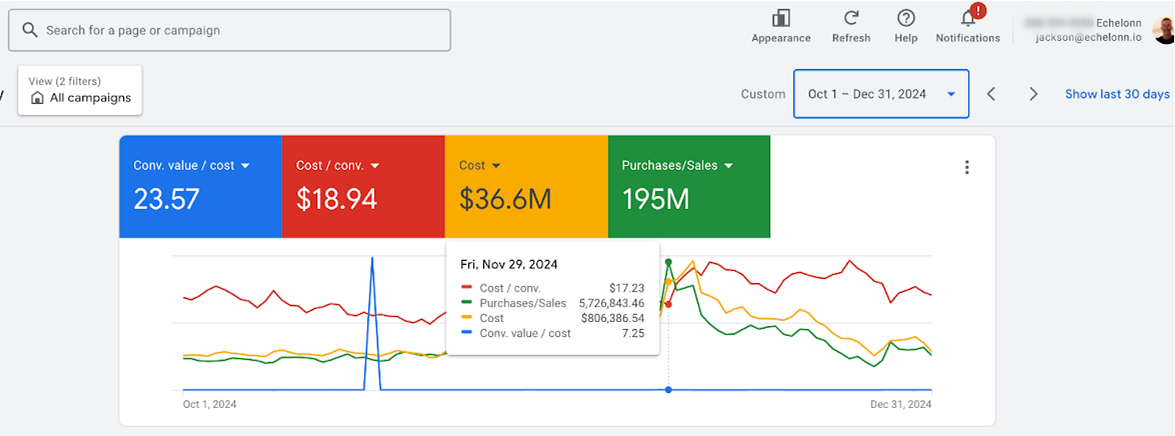
TL;DR: Most DTC brands use outdated Google Ads strategies for BFCM, leading to poor results. Success in Q4 depends on five key areas: scalable campaign structure, budget plans that protect ROAS during high spending, effective Merchant Center tactics, adaptable ad copy, and retargeting strategies that generate profit. My team and I have generated over $195M in Q4 revenue for more than 100 brands by focusing on these details.
1. Should We Launch New Campaigns for BFCM or Just Optimize What’s Running?
The worst move in Q4 is treating BFCM like a fresh campaign buildout. You don’t have time for learning phases, and new campaigns competing with established ones.
For Search and Shopping:
The brands my team scaled profitably optimized the campaigns that were already working:
- Used Google’s scheduled headlines feature to layer BFCM messaging on top of evergreen copy
- Created BFCM-specific product bundles with dedicated landing pages
- Injected promotions directly into product titles. Searchers type “Black Friday [product]” and you lose clicks if your feed doesn’t match
For Performance Max:
We tested this across 100+ brands: launching separate pMax campaigns for BFCM creates volatility.
Our approach is to create time-based asset groups within existing pMax campaigns:
- “Early Bird” asset group (Oct 25 – Nov 20): Messaging focused on beating the rush
- “Black Friday” asset group (Nov 20-27): Psychology for that specific day
- “Cyber Monday” asset group (Nov 28 – Dec 1): Fresh angle for final push
- “Last Chance” asset group (Dec 2-9): Scarcity-driven copy for late buyers
Google’s AI responds better to specialized, time-based asset groups during high-competition periods.
Similar to how email segmentation drives better engagement, your ad creative should match where customers are in the buying journey.
One Exception: Demand Gen for List Building
So for the main conversion drivers, we optimize. But if you want the best results we do recommend rolling out 1 fresh type of campaign.
Run Demand Gen campaigns 2-3 weeks before BFCM to build warm audiences. Set up early-access landing pages, capture emails, retarget when your sale goes live.
Every email you capture here also joins your owned channels, so plan your BFCM email and SMS strategy before these sign-ups start arriving. At Chronos, they go into the VIP early-access list we start building with brands every October.
Then during BFCM, launch video ads:
Launch a separate campaign with the Reach objective with 6-15 second non-skippable ads hitting only warm audiences. This buys lower-cost reach inventory aimed only at people who already know your brand.
On YouTube, keep your campaigns running and update the copy for BFCM. Keep the creatives that are already working for you.
As on Meta, keep your evergreen ads live and add BFCM messaging on top.
Summary: Optimize your existing structure and use new campaigns only for list-building plays that feed your retargeting engine.
What changed in Google Ads for BFCM 2026
Four Google updates from the last two years affect this plan. Performance Max campaigns now accept campaign-level negative keywords (rolled out from January 2025), and during 2025 Google added search terms reporting and a channel performance report (first as a beta), so you can see which queries and channels take your BFCM spend. Google also upgraded Video Action Campaigns to Demand Gen, with the last campaigns moved over by April 2026, so plan your pre-BFCM list-building video inside Demand Gen. In Merchant Center, the old Shopping Experience Scorecard is now the Store Quality page covered in section 3.
2. What’s the Best Approach for Budgets and Bids during BFCM for Google ads?
Arrive with Targets Already Set
When preparing for BFCM, set tCPA and tROAS targets in Google Ads based on your historical data. Check last year if you have the data. Check recent months. Use this to find targets that are realistic but challenging to Google and your brand.
Budgeting:
If you target a 2x ROAS and typically spend $1,000/day, allocate a daily budget of $4,000 or more. This provides Google’s algorithm with sufficient room to spend during the BFCM volume spike, knowing it can still achieve a 2x ROAS at scale.
For campaigns without set targets, such as YouTube campaigns, you will need to manually adjust the budget. When scaling, focus on analyzing the data, adopt strategies similar to those you use on Meta for this.
Key takeaway: Scaling works if your margin math holds and your account is prepped for volume. If you’re waiting until November to figure that out, you’re behind.
3. What’s the Right Play for Merchant Center During BFCM?
GMC Promotions Are Non-Negotiable
If your shopping ads don’t have an offer badge during BFCM, shoppers scroll past you to competitors who do.
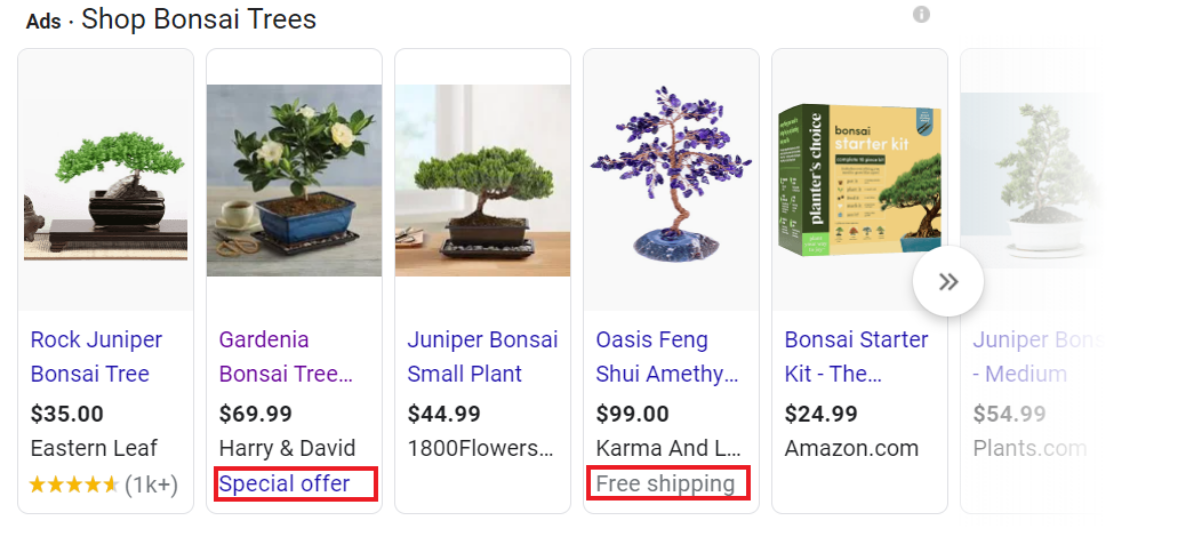
How to Set Up GMC Promotions:
Navigate to Merchant Center → Marketing → Promotions and create layered offers:
- Core discount (e.g., “20-50% Off Sitewide”) for broad appeal
- Threshold offers (e.g., “Free shipping over $100”) to lift AOV
- BOGO or bundles for high-margin products
Critical setup details:
- Use promo codes when possible (minimizes rejection risk)
- Title must match what happens at checkout (Google is strict)
- Set specific start/end dates aligned with BFCM timeline
- Apply promotions sitewide or filter by product type
Store Quality (formerly the Shopping Experience Scorecard)
Check your Store Quality page in Merchant Center (under Products & store in the left menu) across:
- Shipping experience
- Returns experience
- Purchase experience
- Browsing experience (image resolution, images per item, website speed)
- Store rating
Hitting “Exceptional” status earns the Top Quality Store badge on your listings (boosts CTR) and higher rankings in paid Shopping results.
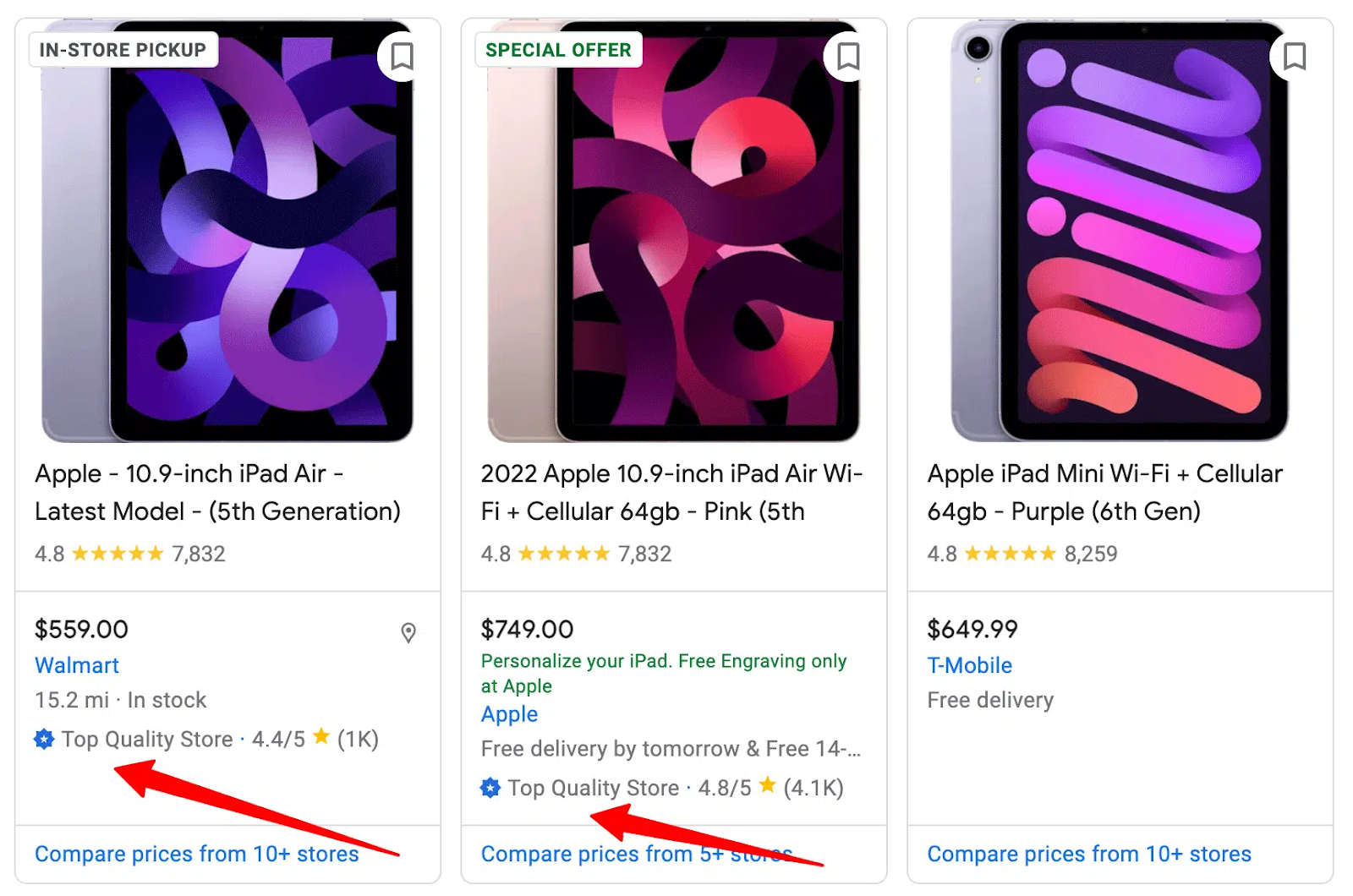
Even 7 to 9 figure brands I audit have basic issues here: incorrect shipping times, missing return policies, limited payment options. All fixable in a week.
I’ve covered this extensively in our BFCM Media buying playbook, where we break down the optimization tactics we use.
Watch
Watch Josh fix a $17M Klaviyo account before Black Friday
The six checks we run on every brand before Black Friday, in the order they cost you money: deliverability, pop-ups, segments, flows, SMS and the campaign calendar.
Get the six checks as Claude prompts, plus the cheatsheet: download the free kit →
4. How Do We Actually Manage Search Ad Copy During BFCM?
The old way took hours of manual work: create BFCM ads, pause evergreen ads, manually swap everything back, then spend February finding forgotten “Black Friday 50% Off” headlines.
Google fixed this with scheduled headlines and descriptions for Search Campaigns, and almost no one uses it correctly.
How Scheduled Assets Work:
- Assets → “+” → “Headline” or “Description”
- Write BFCM copy (e.g., “Black Friday Sale: 50% Off”)
- Pin to Position 2 (prioritizes over evergreen)
- Schedule start (Nov 15) and end date (Dec 2)
- Apply across all campaigns
Google automatically shows BFCM headlines during scheduled dates, then removes them. No manual toggling.
Don’t run the same message from November 1 to December 9. Customer psychology shifts.
Here is how the messaging can shift through the season:
Pre-BFCM (Nov 1-14):
- Regular value messaging
- Price assets: Show regular prices (establishes anchoring)
- Promotion assets: “Black Friday savings coming soon”
BFCM Launch (Nov 15-27):
- “Black Friday Sale: 50% Off” / “Limited Time: Huge Savings”
- Price assets: Sale prices with savings indicators
- Promotion assets: “Black Friday: 48 Hours Only”
Cyber Monday (Nov 28 – Dec 1):
- “Cyber Monday Final Hours”
- Aggressive time-sensitive messaging
Post-BFCM (Dec 2-9):
- “Final Hours” / “Last Chance Savings”
- Callout assets: “Sale Ends Tonight” / “Limited Stock”
Layer in promotion assets, sitelink assets to BFCM landing pages, updated price assets, urgency callout assets, and “Black_Friday” in display paths.
5. Where Does Retargeting Fit Post-BFCM?
We approach this with Three Audience-Building Approaches (Start in October):
1. Website Visitors (Beyond Default 30-Day Lists)
Create specific audiences in GA4:
- Cart abandoners from BFCM week
- Product page visitors who didn’t buy
- High-intent visitors (3+ minutes, 5+ pages viewed)
- Date-specific audiences (Nov 20-30 visitors)
Segmented lists let you match messages to behavior. Someone who abandoned a $200 cart needs something different than someone who browsed 20 seconds.
2. Customer Match Lists (Email Uploads)
Upload CRM segments:
- High-value customers (top 20% by revenue) → Push premium offers
- Cart abandoners → “Complete your order” messaging
- BFCM subscribers who didn’t buy → Retarget post-sale
- Existing customers → Exclude from acquisition campaigns
3. YouTube Channel Audiences for Video Campaigns
Link your YouTube channel (and, where you can, your influencers’ channels) and create lists for:
- Channel subscribers
- People who watched specific videos
- People who viewed your video ads
- YouTube viewers from specific date ranges
The Post-BFCM Retargeting Strategy
After Cyber Monday, competition drops. CPMs fall. But you’re sitting on warm audiences primed to buy. For shoppers who already bought, email and SMS carry the follow-up, and Chronos lays out the December plan for bringing BFCM buyers back.
Our typical timeline and gameplan:
- Pre-BFCM: Run Demand Gen for list building
- During BFCM: Hit audiences with 6-15 second non-skippable video ads
Post-BFCM: Reallocate heavy budget to retargeting.
Want Chronos to plan the email and SMS side of BFCM around the buyers these campaigns bring in?
Book a Free Strategy SessionWhy These Questions Actually Matter
Every brand heading into BFCM faces rising CPMs and thinner margins, and one execution mistake can cost you your biggest revenue week.
The brands that have a strong Q4 are the ones that stress-test their accounts in October, before peak traffic arrives.
These five execution details determine whether Q4 ends in record revenue or an emergency CFO call in December:
- Campaign structure that scales without volatility
- Budget frameworks that protect ROAS at 10-15× spend
- Merchant Center plays that make shopping ads convert
- Copy systems that adapt throughout the season
- Retargeting strategies that turn warm audiences into post-BFCM profit
A note from Chronos
One BFCM offer rule we use with clients covers these promotions too: email and SMS subscribers never get a smaller offer than your ads show. Subscribers who see a better deal in an ad stop opening.
Chronos Agency is an email, SMS and push retention agency and Klaviyo Master Elite Partner for 8 to 9 figure DTC brands, with 500+ DTC brands served. Our email and SMS retention team plans the sends that turn the shoppers your ads bring in into repeat customers.
FAQ
Q: Should I create new Performance Max campaigns specifically for BFCM?
No. Launching separate pMax campaigns creates volatility and forces the algorithm to relearn. Instead, create specialized asset groups within your existing campaigns (Early Bird, Black Friday, Cyber Monday, Last Chance). This gives Google multiple tools to match the right message to the right moment without competing campaign structures.
Q: When should I start scaling my Google Ads budget for BFCM?
Start stress-testing in October. If you want to jump from $10K/day to $150K/day during BFCM, increase spend 20-30% weekly throughout October. This gives the algorithm clean data at volume and identifies bottlenecks before peak traffic. Don’t wait until Black Friday to discover your account can’t handle the scale.
Q: Are GMC promotions really worth the setup hassle?
Absolutely. If your shopping ads don’t have an offer badge during BFCM, shoppers scroll past you to competitors who do. One of my clients saw promotion-driven clicks jump from zero to 5,400+ in 30 days. For a $50 AOV brand missing just 10 conversions/day, that’s $15K in lost monthly revenue.
Q: What’s the biggest copy mistake brands make during BFCM?
Running the same “Black Friday 50% Off” message from November 1 to December 9. Customer psychology shifts throughout the season, your copy should match. Use scheduled headlines to run progressive messaging: value anchoring pre-BFCM, urgency during peak days, scarcity post-BFCM.
Q: When should I shift the budget to retargeting audiences?
Start building retargeting lists in October (website visitors, customer match, YouTube audiences). During BFCM, hit them with direct offers. After Cyber Monday, shift 20-30% of budget to retargeting, CPMs drop but warm audiences are still primed to convert. One of my brands saw December ROAS jump 60% with this shift.
Q: When does BFCM 2026 fall for Google Ads planning?
Thanksgiving is Thursday 26 November 2026, Black Friday is 27 November and Cyber Monday is 30 November. The asset groups and scheduled headlines in this plan run from late October to 9 December, with BFCM headlines scheduled from 15 November.
Q: What should happen after a Google Ads shopper buys during BFCM?
Email and SMS take over. Chronos sends first-time BFCM buyers a post-purchase sequence with confidence and product education first, then a relevant second product, and no discount in the first email. Tag them as BFCM first-time buyers so your January winback can speak to them as customers.
Ready to get started? Let’s discuss how Chronos can help your ecommerce business thrive.
Book a Free Strategy Session